RankThat for Agencies: Reports and a Client Portal
BY THE DHM TEAM4 MIN READ
On this page, 09 sections
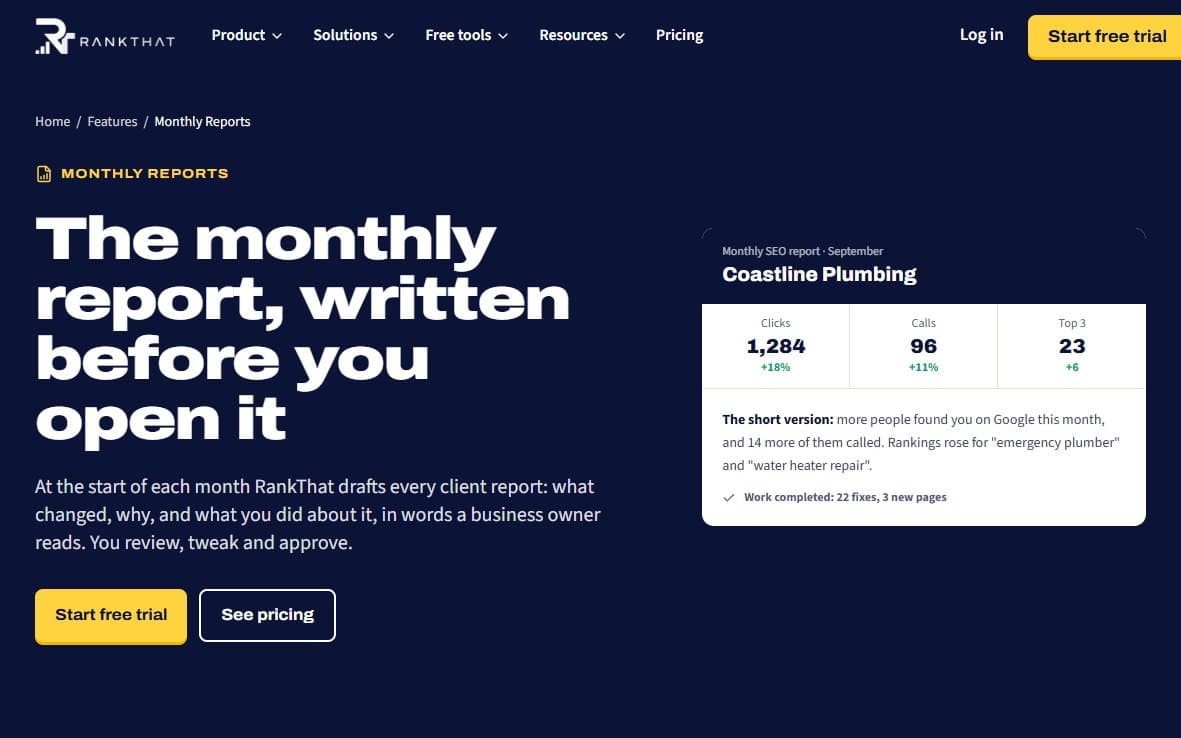
For many agencies, the monthly SEO report is the most expensive document they produce. Pulling Search Console numbers, screenshotting rankings, remembering what the team did, then writing a summary a business owner will read: it takes hours per client, and with twenty clients the first week of the month is gone.
We built RankThat inside our agency to run our own client work, so this part had to work. This fourth post in our RankThat series covers the monthly reports and the client portal.
The report is drafted before you open it
Reports are built from fresh data, so the first days of the month run in order:
- The 1st: a site audit for every project not audited in the last 20 days, and AI search scans of Google AI Overviews and ChatGPT.
- The 2nd: an organic search snapshot, and Google reviews captured.
- The 3rd: last month's report drafted for every project with Search Console data or tracked keywords.
When a draft is ready, the project owner is told it's ready to review. If that month's report already exists, it is never overwritten, because it may hold your edits.
What goes in
The executive summary is written in plain English from everything below it, in the tone you choose. The sections draw on data RankThat already has:
- Leads from search: form submissions and taps on phone, email and WhatsApp links counted by the free WordPress plugin, or key events from Google Analytics.
- Work completed: collected from what actually happened in RankThat, such as fixes applied, issues resolved and articles published. You can add your own lines too.
- Search Console and Google Analytics 4: clicks, impressions, sessions and channels.
- Rankings, map rankings, reviews and AI search: from the rank tracker, the Local Rank Grid, Google reviews and AI Visibility.
Stores get their own layout, which leads with revenue and the pages that earn it.
Settings for each client
Every client's report can be set up differently and saved as their default:
- Layout: automatic, service (leads, maps and reviews first) or store (revenue first).
- Tone: optimistic, which celebrates the wins, or balanced, which gives ups and downs equal space.
- Compare with: the previous month, the same month last year, three months earlier, or nothing.
- Sections: switch any section on or off, and choose whether drops are mentioned in the summary.
Fair comparisons
A month with 31 days usually beats a month with 30, and February looks like a disaster every year. RankThat compares Search Console clicks and impressions per day, so a shorter month isn't reported as a decline that didn't happen. The year-on-year option helps seasonal businesses: an HVAC company should be compared with last July, not last June.
You approve, you send
You can change every word, reorder the summary, and add up to ten sections of your own. Editing an approved report puts it back to draft, so nothing changes after approval without a second look.
Reports are never emailed automatically. A person clicks send, adds the recipients and an optional note, and the client gets the opening line and the month's main points, with the PDF attached. Replies go to your agency's email address. On the Professional and Enterprise plans, reports and PDFs carry your brand rather than RankThat's, and the written summary never names the tools behind it.
Two limits, from RankThat itself: there is no call tracking integration, so calls come from tap counts, Analytics events or numbers you type in; and Google Business Profile views and calls aren't in the report yet.
The client portal
Clients ask the same questions between reports. The portal lets them look for themselves, without seeing anything they shouldn't.
A client gets a read-only login for their own sites. Their dashboard shows visits from Google, times seen in Google, keywords on page one and leads this month, in words an owner understands. They can also open their rankings, search performance, map results, reviews, AI visibility, Google Analytics and every finished report.
What clients never see:
- Draft reports. Only approved and sent reports appear.
- Your other clients. A client sees only the sites they're invited to.
- Settings, billing and tools. No audits, keyword research or content tools.
- Alerts. Ranking drops go to your team, so you decide how to explain them.
Inviting a client takes one email, and a client with several locations accepts every invite with one click. One thing to know if you want a fully white-label setup: the invite page carries a small "Powered by RankThat" line. Clients count toward your plan's team members per site, three on Professional and unlimited on Enterprise.
Team access across many sites
For your own team, Settings has a Team page where you give someone Editor or view-only access to chosen sites, or to all sites, including new ones. Set a new hire up that way and every client you sign later is already in their list. When someone leaves, one click removes them from every site.
Recently shipped for agencies
RankThat ships most weeks. The agency changes from late October and early November, from its What's new page:
- 26 October: fair month comparisons, and a portfolio page with every site's clicks against last month and last year.
- 27 October: access to many sites for one person in one step.
- 30 October: Enterprise in three sizes, for 25, 50 or 100 client sites.
- 3 November: one connector for every AI agent, so Claude, ChatGPT and others can answer questions from your RankThat data.
Try it
Every RankThat plan starts with a 14-day free trial. And if you'd rather hand the monthly SEO work to an agency, that's what our SEO service does. Our free audit is a good place to start.