Does ChatGPT Recommend You? Checking AI Visibility
BY THE DHM TEAM4 MIN READ
On this page, 07 sections
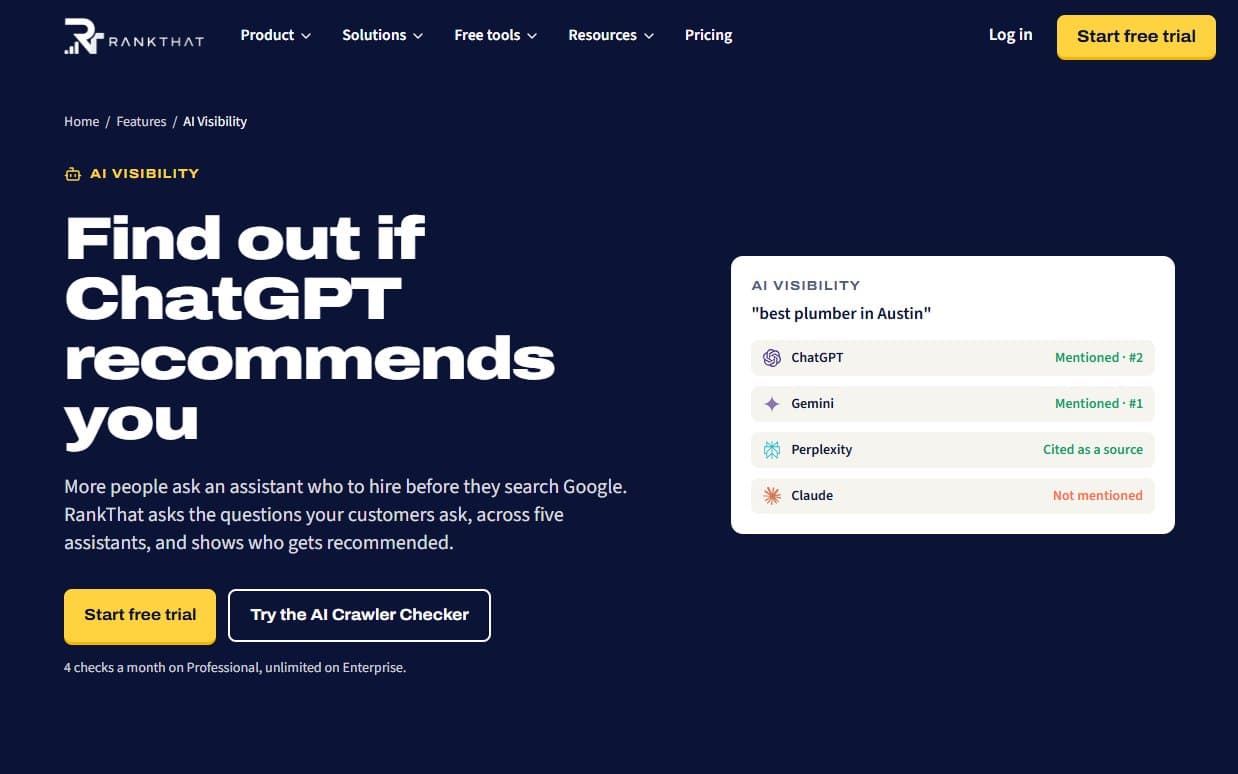
More people now ask an assistant who to hire before they search Google. The answer usually names a few businesses and cites a few websites. AI visibility tracking measures whether yours is one of them.
We've written about how to get cited by AI search. This post, the third in our RankThat series, covers how RankThat measures it, and two free tools you can use today without an account.
Five assistants, two kinds of scan
RankThat checks Google AI Overviews, ChatGPT, Perplexity, Gemini and Claude, in two different ways:
- Google and ChatGPT: RankThat looks up your domain in a large database of recorded AI answers, up to 200 questions per language. This finds the questions where you already appear.
- Perplexity, Gemini and Claude: RankThat asks the assistants live, with web search on, up to 10 questions per scan. This shows today's answer.
You don't type the questions in. For the live scan they come, in order, from questions where Google or ChatGPT already cite you, then your tracked keywords, then content topics you've approved. That keeps them tied to what the business sells.
Mentions, citations and position
Three words get used loosely, so here is what they mean in RankThat:
- A mention is an AI answer recorded for one of your questions.
- A citation means your site appears in that answer's sources. This matters most: it is the assistant pointing people at you.
- Position is where you appear in the list of sources. First of five beats fifth of five.
Competitors are checked the same way, so you can see who gets cited when you don't.
The AI Visibility Score
The score runs from 0 to 100, with a letter grade, and has five parts:
- AI presence (35%): how often you are mentioned and cited.
- AI readiness (25%): from your latest site audit, covering AI crawler access, llms.txt, structured data and crawlability.
- Platform coverage (15%): how many of the assistants cite you.
- Share of voice (15%): your share of citations against competitors.
- Sentiment (10%): whether the sentences that mention you read positively.
AI readiness is the part you control directly, because assistants can only cite pages they can read. Under the score, RankThat lists recommendations. Some it can draft for you and, on WordPress or through a Cloudflare Worker, apply once you approve: unblocking AI crawlers in robots.txt, adding Organization schema, and adding an llms.txt file.
The honest limits
RankThat is upfront that AI tracking is a young field:
- You can't add your own questions yet.
- Location is country-level, not a particular suburb.
- The live scans count citations, so a brand name mentioned without a link isn't detected there.
- Sentiment is a simple word check, a rough signal rather than a judgment of tone.
- Assistants change their answers often, so one scan is a sample. The trend over months is what to report.
And nobody can promise that an assistant will recommend a business. What the tracking does is show where you stand, and whether the work moved it.
Free tool: the AI Crawler Checker
Before anything else, check that AI crawlers are allowed to read your site. The AI Crawler Checker reads your robots.txt and tests your homepage, or any page you type, for ten AI bots at once.
The useful distinction is between two kinds of bot:
- Answer bots fetch pages to answer a question right now: OAI-SearchBot, ChatGPT-User, Claude-SearchBot and PerplexityBot. Block these and you are kept out of AI answers.
- Training bots collect pages to train future models: GPTBot, CCBot and Google-Extended, for example. Blocking these only opts you out of training.
Blocking training bots is a fair business choice. Blocking answer bots by accident is the expensive mistake the checker is there to catch. Two details worth knowing: blocking GPTBot doesn't remove you from ChatGPT search answers, and Google-Extended doesn't affect Google Search.
robots.txt is only half of it. Firewalls and bot protection, such as Cloudflare's AI bot blocking, can turn AI crawlers away even when robots.txt allows them, and the checker can't see that.
Free tool: the llms.txt Generator
llms.txt is a proposed standard: a plain Markdown file at the root of your site that says who you are and lists your most useful pages, so assistants can understand the site quickly.
The llms.txt Generator drafts one from your homepage and up to 25 pages it links to. No AI writes the draft: it arranges your own page titles and meta descriptions, so it is only as good as those. RankThat suggests about fifteen minutes of editing, then saving it at yoursite.com/llms.txt.
Be realistic about it. Adoption is still early and no assistant promises to read the file, but it costs nothing to add. On WordPress, or through a Cloudflare Worker, RankThat can write and serve it for you.
Where to start
- Run the AI Crawler Checker and make sure the answer bots can read your site.
- Generate an llms.txt, edit it, and upload it.
- Track what assistants say over the following months, with RankThat's 14-day free trial or by asking us.
Our free audit already looks at AI crawler access as part of its technical pass. If you'd like a team to work on how assistants see your business, that is our AI visibility service.
Next in this series: what RankThat does for agencies, from the monthly report to the client portal.