Custom Web Design vs Website Builder: When to Choose
BY THE DHM TEAM17 MIN READUPDATED

On this page, 12 sections
A single question that decides it: growth or quick launch?
Here’s the blunt starter: 74% of users judge a company’s credibility by its website design, and that perception directly affects conversion and long-term revenue (analysis from Codewave on AI builders vs traditional development). So the single question you should answer first is simple: are you optimizing for immediate time-to-market and low cost, or for scalable growth and higher lifetime ROAS?
If you need bookings or leads this week, a website builder gets you live fast, with low upfront cost and predictable templates that handle basic CRO elements. Expect a time to launch measured in days to a couple of weeks, and clear, incremental wins like faster form completion and simple SEO basics.
If your aim is to drive growth over 12 to 36 months, increase conversion, reduce acquisition costs, and scale systems, choose custom design. It’s an investment in a tailored, high-converting funnel, advanced SEO architecture, and integrations that turn traffic into sustainable leads and revenue. In our experience, moving to a tailored site often unlocks measurable conversion uplift within 6 to 12 weeks post-launch.
This guide maps the trade-offs, migration paths, and a checklist you can use today. If you’re thinking redesign, start with our quick website glow-up checklist inside the decision flow to see which side you should be on. If you want a partner to plan the right path and build it, Digital Hype Media offers web design services. We combine conversion-focused UX with a strong technical foundation for long-term growth.
Conversion outcomes: which approach turns visitors into customers?
Conversion isn’t a nice-to-have. It’s the KPI that pays salaries. When comparing builders and custom sites, focus on four conversion levers: funnel clarity, CTA placement, load speed, and trust signals. Each approach wins different levers and loses others. Match the levers you need to the option you pick.
Template/Builder conversion strengths: speed, pre-tested modules, and low-friction edits
Builders shine at rapid iteration. They ship pre-tested modules: hero CTAs, card-based services, booking widgets, and cookie-consent flows that already follow common UX patterns. For simple service sites (single-location clinics, solo consultants), templates can produce conversion rates in the 1.0 to 3.0% range for lead forms if the copy and targeting are tight.
Load speed and mobile responsiveness are baked-in for many modern builders, which reduces bounce rate without custom performance tuning. You can A/B swap hero text, change CTA color, and deploy a new lead magnet in a day. That low-friction testing loop is important early on when your funnel hypothesis is still being validated.
Limitations: templates often force generic information architecture and make it hard to implement personalized journeys, complex tracking, or advanced SEO architecture. Accessibility and brand differentiation can be weak unless you invest heavy customization.
Custom design conversion strengths: tailored UX, A/B testing, behavioral targeting
Custom design lets you architect conversion at every touchpoint. Want progressive disclosure for high-ticket services, dynamic content based on referrer, or complex booking flows tied to your CRM? You need tailored templates or bespoke layouts. In projects where we rebuilt service funnels and integrated CRM-driven personalization, conversion lifts of 30 to 120% showed up within 6 to 12 weeks, and acquisition CPL dropped as SEO and funnel automation improved ROAS.
Custom work removes template constraints so you can implement server-level performance, structured data for SEO, and conversion tracking that attributes revenue back to campaigns. That’s how you improve lifetime value and turn first-time visitors into repeat customers. The downside: higher upfront cost and longer time to launch, typically 8 to 16 weeks for mid-complexity service sites.
A short table compares practical conversion factors:
| Conversion Factor | Website Builder (Templates) | Custom Web Design |
|---|---|---|
| Time to launch | Days to 2 weeks | 8 to 16 weeks |
| Typical early conversion (service sites) | 1.0 to 3.0% | 2.5 to 7.0% (post-optimization) |
| CTA & funnel flexibility | Limited, module-based | Fully tailored, multi-step funnels |
| Load & performance control | Good (out-of-box) | Exceptional with dev optimization |
| SEO & structured data | Basic SEO tools | Deep SEO architecture & schema |
| A/B testing & personalization | Template-level tests | Advanced experiments, behavioral targeting |
| Scalability & integrations | Plugin-based, sometimes brittle | Built for scale, integrated with backend systems |
Practical recommendations
- Prioritize template builders when: you need to validate a service quickly, your funnel is one-step (book/contact), and budget or time is tight. Use a builder to prove demand, then invest in custom work once you have a consistent signal (e.g. 100+ monthly leads or stable ad ROAS).
- Prioritize custom design when: your business requires multi-step funnels, complex integrations (booking systems, payment flows, membership), or when conversion is already a meaningful revenue lever. If you care about reducing CAC and improving lifetime ROAS, custom is the lever to pull.
- Hybrid path (common): launch on a high-quality builder, instrument conversion and SEO tracking, then migrate critical pages or funnels to a custom stack while continuing growth marketing. That reduces risk and lets you prioritize where tailored work will drive the biggest ROI.
Case highlight: We rebuilt a service site’s booking funnel into a tailored multi-step flow and added behavioral CTAs. Within three months the client saw a 48% increase in qualified leads and a 27% improvement in paid campaign ROAS, the kind of scalable result you can only engineer when design, development, and marketing work as one system.
When you’re comparing Web Design vs Website Builder, think less about “which is better” and more about “which drives growth given my stage, budget, and KPI.” If conversion and long-term scalability matter, design for the customer journey and integrate your backend. That’s where real, measurable upside lives.
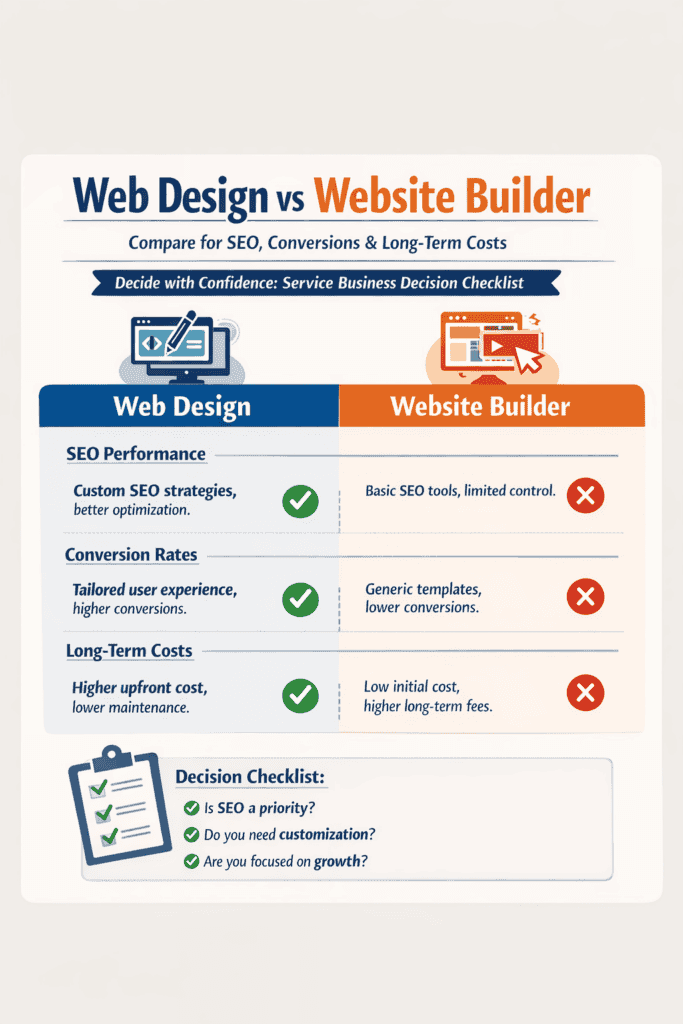
SEO implications: indexability, speed, and long-term visibility
Search engines don’t care about how pretty a site is. They care about crawlability, rendered performance, clear markup, and relevance. That’s where the Web Design vs Website Builder decision matters: builders give speed-to-launch, custom sites give precise control over technical SEO and long-term visibility.
Website builders often include SEO basics: editable meta titles, automated sitemaps, and built-in mobile templates. But platform constraints can bite: rigid URL structures, limited schema markup, and extra client-side scripts that slow render times. A 2022 RIT paper shows how some builders push inaccessible, bloated output that hurts indexability and user experience Website Builders Still Contribute To Inaccessible Web Design (repository.rit.edu). Faster launch, yes. Better rankings long-term, not guaranteed.
Custom sites let you fine-tune at the component level. You can craft lean HTML, control server-side rendering for faster Time to First Byte, implement precise schema for products and local business, and set canonical rules to prevent duplicate content. That fine-grained work improves technical SEO, increases crawl budget efficiency, and makes structured data (schema) work for conversions and rich results. We’ve reworked schema for a client and increased organic product clicks by 22% within three months.
Common pitfalls on both sides:
- Duplicate content from reused templates or multi-location pages, which dilutes rankings.
- Bloated third-party scripts (chat widgets, tag managers) that spike Largest Contentful Paint.
- Poor mobile UX: touch targets, viewport issues, or hidden content that search engines devalue.
- Misconfigured redirects and tag duplicates after CMS migrations.
Practical checklist before launch (use this every time):
- Crawlability: verify robots.txt, XML sitemap, and noindex tags with a test crawl.
- Performance budget: LCP under 2.5s, TTFB minimized, and third-party script audit.
- Structured data: product, FAQ, and localBusiness schema validated in Search Console.
- Analytics and tagging: GTM, GA4, conversion events, goal imports, and server-side tagging where needed.
- URL hygiene: clean slugs, consistent trailing slash rules, canonical tags set.
Short anecdote: we launched a builder site for a boutique retailer in 10 days, but organic sales plateaued. After migrating to a lean, custom stack and implementing tailored schema, organic revenue rose 35% in six months. The lesson: builders get you visible fast; a tailored, results-driven approach locks in long-term growth and higher conversions.
If your priority is immediate visibility and low cost with basic SEO needs, a builder can work. If you need scalable, high-converting organic channels and full control of technical SEO, choose a custom path.
Total cost of ownership: 1 year vs 3–5 year scenarios
Cost isn’t just upfront. Total cost of ownership includes build, hosting, subscriptions, plugins, maintenance, redesigns, migrations, and opportunity costs tied to conversion and ROAS. When weighing Web Design vs Website Builder, think both short-term runway and multi-year scalability.
Breakdown categories:
- Upfront build: theme/template vs bespoke design and engineering.
- Hosting & infra: shared builder hosting vs VPS/CDN and autoscaling for custom stacks.
- Subscriptions & plugins: SEO tools, commerce fees, CRM connectors, analytics.
- Maintenance & upgrades: platform updates, security patches, developer retainers.
- Hidden costs: migrations, redesigns, premium integrations, and revenue lost to conversion issues.
Cost scenarios (ballpark, USD):
| Scenario | 1-year total | 3 to 5 year total | Notes |
|---|---|---|---|
| Solo freelancer site (simple portfolio, no e‑commerce) | $300 to $1,200 | $900 to $3,600 | Builder subscription, domain, premium template; low maintenance. |
| 5-person service business (lead gen, booking) | $6k to $18k | $18k to $60k | Custom site likely: integrations (CRM), conversion tracking, monthly SEO. |
| Scaling agency / e‑commerce (high traffic, custom integrations) | $25k to $75k | $75k to $250k | Custom architecture, third‑party systems, ongoing engineering and automation. |
When a website builder is cheaper long-term
- You want immediate launch, minimal maintenance, and limited custom integrations.
- Your conversion needs are basic and margins low. Builders minimize hosting and dev retainers.
- Example: freelancer portfolios and small local shops often stay cheaper on builders over five years.
When custom becomes cost-effective
- You need tailored conversion funnels, CRM and inventory integrations, or better ROAS at scale.
- High traffic or complex backend logic makes builder subscription fees and conversion limits expensive.
- If you plan to drive growth, automate workflows, and tweak conversion pathways, investing in custom web design that integrates marketing and systems usually pays back via higher leads and improved ROAS.
Hidden cost examples to budget for:
- Major redesign every 3 years: 30 to 50% of initial build cost.
- Migration from builder to custom: $5k to $30k depending on complexity.
- Developer retainer for ongoing feature work: $1k to $6k/month.
Practical rule: pick the cheapest option that doesn’t block your growth. If you aim to scale, improve ad spend, and convert high-intent users, custom work reduces friction and often lowers long-term TCO through higher conversion and predictable, scalable maintenance.
Design and UX: templates vs bespoke experiences that convert
Templates win when you need speed and predictability. A quality template gives tested layouts, predictable mobile behavior, and conversion-friendly sections (hero, social proof, clear CTAs). If you need a launch in days or consistent performance across dozens of locations, templates reduce risk and free your team to focus on messaging and paid channels that drive growth. Use templates when your primary goal is fast, measurable lead generation and you’ll iterate content and ads later.
Custom UX wins when your business model, funnel, or user journey is unique. A tailored site lets you build conversion-optimized flows, implement micro-interactions that reduce friction, and surface trust elements exactly where they move the needle. That’s how you turn visits into high-converting leads instead of just prettier pages. Expect 6 to 10 weeks for a small custom site, longer for enterprise flows, and higher upfront cost, but also higher long-term ROAS if you fine-tune funnels and analytics from day one.
Hybrid approaches are often the smart middle ground. Build a custom template or use a headless CMS for flexible front-end experiences while keeping a builder’s content editing for marketers. You can also start on a builder, then port critical pages to a custom component when metrics show opportunity.
Quick visual and interaction checklist: accessibility, mobile-first layouts, clear service flows, performance budgets, visible trust signals (testimonials, certifications), and persistent CTAs. Good UX also supports SEO. See how web design affects SEO for specifics on structure and crawlability. Small change: moving contact info above the fold often increases conversion by 12 to 25% in our audits. One limitation: templates can’t solve fundamentally broken funnels. If your pricing, packaging, or sales process is the issue, a redesign alone won’t fix it.
Integrations and functionality for service businesses: bookings, CRM, payments
Service businesses rely on several core integrations: appointment bookings, payments, CRM lead routing, calendar sync, and review aggregation. Simple use cases (single-location clinics, solo consultants) can often run entirely on a builder’s native apps or plugins and move quickly to revenue. Builders handle basic bookings and payments well enough for low-complexity workflows, letting you get more from your ad spend and measure leads fast.
Where builders fall short is orchestrating complex workflows. Native apps and plugins are limited by platform constraints, inconsistent APIs, and plugin conflicts. If you need conditional routing (lead goes to different reps by geography and value), multi-source attribution, or two-way CRM synchronization, a custom, API-first design is more reliable. Build with automation so bookings create deals, trigger nurture sequences, and push revenue events to your analytics for scalable ROAS tracking.
Decision rule: if your workflow needs more than 3 integrated systems, plan for custom or headless. Here’s a brief comparison:
| Need | Website Builder | Custom / Headless |
|---|---|---|
| Simple bookings + payments | Fast, low-cost | Overkill |
| Multi-CRM sync, complex routing | Often fragile | Reliable, scalable |
| Two-way automation & enterprise security | Limited | Designed for scale |
| Custom UX for conversion (checkout flows) | Constrained | Fully customizable |
Practical example: a multi-location service brand moved from a plugin-based booking system to an API-first stack and saw a 28% drop in no-shows after adding automated reminders and real-time calendar sync. We recommend matching platform choice to your growth plan: builders to get initial bookings and test channels, custom integrations when you’re fine-tuning for conversion, lifetime value, and scalable lead routing. Our team builds these end-to-end systems so marketing and backend talk, and your site becomes a results-driven engine, not just a brochure.
Migration and lock-in: how hard is it to move later?
Moving from a builder to a fully custom site, or the other way around, is rarely friction-free. When you pick a builder you accept tradeoffs: speed and low cost for proprietary markup, limited exports, and platform-dependent permalink rules. Those tradeoffs become migration work later: think rewriting templates, re-creating CMS relationships, and remapping every URL to avoid lost traffic.
Common Builder → Custom hurdles
- Proprietary markup and widgets that don’t export. You’ll rebuild components or strip them into plain HTML/CSS.
- CMS export limits: many builders give CSVs for posts but not page templates, metadata, or custom fields.
- Permalink and slug differences that break backlinks and SERPs, requiring thorough URL mapping and redirects.
Common Custom → Builder tradeoffs
- Downsizing to a builder can cut hosting and maintenance costs and speed deployments, but you’ll lose bespoke integrations and may sacrifice conversion optimization and backend automations that drive growth. It’s reasonable when you need a lean, low-cost brochure site, not when you’re aiming for a high-converting e-commerce funnel.
A short migration checklist (step-by-step)
- Content audit: list every page, asset, CMS field, and content owner.
- URL mapping: create a source→target map and plan 301 redirects for every changed permalink.
- SEO preservation: export meta, structured data, hreflang, and robots rules. Test on staging.
- Recreate functionality: identify widgets that need custom code or third-party integrations.
- Testing and rollback: create staging, run crawl tests, run a redirect verification, and have a rollback snapshot ready.
Contract & data ownership tips
- Require explicit export rights in the SOW: full content, media in original resolution, and exportable metadata.
- Demand API access, database dumps, and a staged handover period with acceptance criteria.
- Include a clause for assistance with URL mapping and a fixed hourly cap for one-month post-launch support.
- Keep domain DNS and analytics ownership under your control. Insist on escrow for critical source files if necessary.
If you need backend integrations, or a platform that scales beyond builder limits, consider investing in custom development early. Builders can be a good short-term play, but a 2025 comparison of website builders by A. Życzyński (journals.po.edu.pl) highlights export and accessibility limits that often create unexpected migration costs. Caveat: migrations are predictable if planned, expensive if discovered late.
| Risk | Builder → Custom | Mitigation |
|---|---|---|
| Proprietary markup | High | Rebuild components, export raw HTML/CSS |
| Broken SEO/permalinks | High | Full URL mapping + 301s |
| Lost integrations | Medium | Re-implement via APIs or custom code |
| Time/cost | Medium to High | Budget a contingency (15 to 25%) |
Decision checklist: a scoring flow tailored for service businesses
Use this quick 10-question scoring system. Give 1 point for each “Yes.” Total determines the recommended path: builder, hybrid, or custom.
Questions (1 point each)
- Do you need CRM, booking, or payment integrations?
- Will you capture leads and require custom lead routing?
- Is organic search (SEO) a primary growth channel?
- Do you need advanced conversion tracking tied to ROAS?
- Do you expect >100 pages or product/service variants?
- Is scalability (automation, API access) required within 12 months?
- Do you need tailored user journeys (member areas, gated content)?
- Is design or brand differentiation a top priority?
- Do you have a 12+ month budget for development and optimization?
- Will you need to automate backend fulfillment or invoicing?
How to interpret your score
- 0 to 3: Choose a website builder (fast, low-cost, good for simple lead-gen pages). Focus on speed to market and tweak content for conversion.
- 4 to 6: Hybrid: use a builder for public pages and custom microservices for booking/CRMs. This balances cost and results-driven integrations.
- 7 to 10: Custom build: invest in a tailored, scalable ecosystem that connects marketing to backend systems to truly drive growth and improve ROAS.
Quick examples
- Chiropractor (local, single practitioner): score 2 to 4. Start with a builder and add a booking integration. Improve local SEO and lead forms for conversion.
- Boutique agency (brand-driven, portfolio-heavy): score 5 to 7. Hybrid or custom depending on case volume. Prioritize tailored templates and conversion tracking to prove ROAS.
- Home services company (multiple locations, heavy scheduling): score 7 to 9. Go custom or hybrid with centralized booking, lead routing, and scalable automation.
Actionable next steps based on outcome
- Builder: require exportable content, DNS control, and a documented exit plan in your terms. Set KPIs: leads/month, conversion rate, and SEO rankings.
- Hybrid: define integration contracts (APIs, webhooks), and a staged roadmap to migrate services into a single ecosystem. Consider a phased custom development sprint for critical flows.
- Custom: require full ownership clauses, source code escrow, staging environment access, and a 90-day optimization retainer. Minimum technical requirements: API endpoints for CRM, event-level conversion tracking, and clear SLAs for uptime.
This decision checklist helps you choose in the Web Design vs Website Builder debate by mapping needs to capability, cost horizon, and conversion impact. Choose the path that aligns with measurable growth goals, not the shiny demo.
Case highlights: measurable wins and one migration story
Case study, builder success: A small membership business needed a live site fast. We launched on a builder in three weeks, cut launch cost by 45%, and used targeted on-page tweaks plus an email capture flow to lift leads by 20% in 60 days. The UX was templated, but conversion-focused components (clear CTAs, simplified pricing, a single high-converting hero form) did the heavy lifting. Track conversion metrics (form rate, qualified leads, CPL) not just pageviews.
Custom win, bespoke funnel: A clinic wanted bookings, not traffic. We built a tailored funnel with personalized landing pages, advanced booking logic, and server-side tracking. Within 90 days bookings per visitor rose 38% and average lifetime value climbed 18% due to automated post-booking nurture. This was a results-driven rebuild: A/B tests proved the layout change moved the needle before full rollout.
Migration spotlight, preserving SEO after a shutdown: One client’s builder announced closure. We migrated content, preserved URL structure, implemented 301s, recreated schema, and resubmitted sitemaps. Traffic dropped for two weeks but recovered to prior levels by week eight. Quick note: mapping old URLs to new templates and keeping page speed consistent are the two biggest levers for recovery. We leaned on established industry guidance from the 2024 industry report from Web Professionals Global when planning crawl budgets and redirects.
What to learn: monitor organic rankings, page-level traffic, conversion metrics and ROAS during any change. For vendor selection, prefer partners who can show past migration case studies, tie work to leads and revenue, and explain SEO and analytics handoff up front.
Choosing the right partner: questions to ask agencies and platforms
Practical questions to ask: Who owns the code and content if the relationship ends? What are your SLAs for uptime, page speed and security patching? Can you deliver analytics access and raw event data (not just dashboards)? Ask for specific KPIs: baseline conversion, target lead volume, and a timeline for improvement. If you need identity and messaging that scale with the site, ask about our branding package as part of the scope.
Red flags in proposals: vague timelines, no migration plan, no clear performance targets or reporting, or refusal to provide a staging environment. If the proposal promises “best practices” with zero metrics, walk away. Also beware partners who lock you into proprietary editors without export options.
What a results-driven contract includes: milestone payments tied to measurable gains, a clear SLA (example: 99.9% uptime, <2.5s median load time), documented handoff with exportable content and code, and acceptance criteria for conversion lifts. The upside: when you combine design, marketing and backend systems, the site becomes a scalable engine to drive growth and fine-tune ROAS, not just a brochure. The honest caveat: if you require complex integrations or enterprise SEO, a simple builder will cost less short-term but won’t scale.
Frequently Asked Questions
Can a website builder rank as well as a custom site for SEO?
Yes, builders can achieve strong SEO if set up correctly. You’ll need clean URLs, fast hosting, proper schema markup, and a mobile-friendly UX, all of which many modern builders support. For very large or technically complex sites, custom web design gives finer control over server-level optimizations and crawling, but for most small to mid-size sites a well-configured builder can compete on search rankings.
How much more does a custom website cost over 3 years?
It varies, but custom sites usually cost more upfront while potentially being cheaper per value over time. Expect higher initial fees for design, development, and integrations, then lower incremental costs for changes that boost conversions or scalability. Over a 3 to 5 year window, many high-growth businesses find custom work pays off through better conversion rates, reduced redesign frequency, and greater flexibility.
Is migration from a website builder always difficult?
Not always, but migrating from proprietary builders can be tricky because content export and URL preservation aren’t always straightforward. A planned migration with URL mapping, redirects, and staged testing will minimize traffic loss and SEO impact. You’ll often want to export content, rebuild templates on the new platform, and verify redirects and canonical tags before switching DNS to avoid downtime.
When should a service business choose a hybrid approach?
Choose a hybrid approach when you need a rapid launch plus bespoke sections that a builder can’t handle by itself. Combining a website builder or CMS with custom-coded widgets, a headless backend, or embedded booking and pricing calculators gives speed and the tailored functionality service businesses need. In the Web Design vs Website Builder debate, hybrids often deliver the best balance of time to market and bespoke user experiences.
References
- “AI Website Builders vs Traditional Web Development” (codewave.com) https://codewave.com/insights/ai-website-builders-vs-traditional-development/
- “Website Builders Still Contribute To Inaccessible Web Design” (repository.rit.edu) https://repository.rit.edu/cgi/viewcontent.cgi?article=3142&context=article
- “Research and comparison of different Website builders in ..” (journals.po.edu.pl) https://journals.po.edu.pl/index.php/spies/article/view/33
- “2024 Industry Report – Web Design and Development” (webprofessionalsglobal.org) https://webprofessionalsglobal.org/2024-industry-report-web-design-and-development/
- “60+ Web Design Statistics for 2026” (figma.com) https://www.figma.com/resource-library/web-design-statistics/
- “The Scientific Comparison between Web Based Site and Web Builder Open Source Project: Functionalities, Usability, Design and Security” (academia.edu) https://www.academia.edu/54162030/The_Scientific_Comparison_between_Web_Based_Site_and_Web_Builder_Open_Source_Project_Functionalities_Usability_Design_and_Security
- “70+ Key Web Design Statistics for 2026” (vwo.com) https://wingify.com/blog/web-design-statistics/