How to Make Sure Your WordPress Website Is HIPAA Compliant (Without Killing Usability)
BY THE DHM TEAM22 MIN READ

On this page, 10 sections
WordPress can be HIPAA compliant when properly configured with the right hosting, security controls, and business associate agreements, but it requires significantly more than installing an SSL certificate. The open-source CMS powers over 43% of websites globally, yet most healthcare organizations struggle with compliance because WordPress lacks built-in encryption, audit logging, and HIPAA-specific safeguards. This article is informational guidance, not legal advice.
According to the HHS “Wall of Shame,” over 133 million healthcare records were breached between 2023-2024, with the average OCR penalty reaching $1.8 million for covered entities. Many of these violations stem from inadequate website security, unencrypted data transmission, and missing business associate agreements with hosting providers and third-party services.
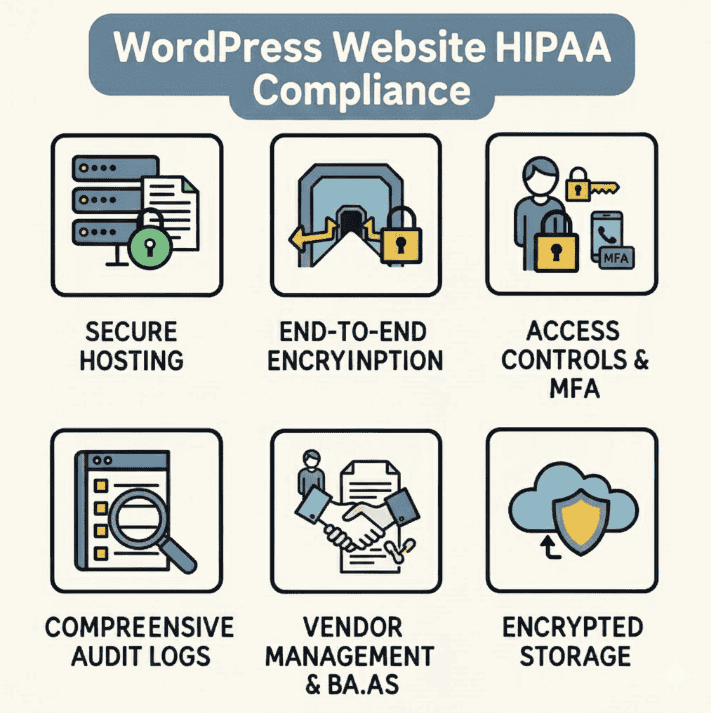
For your WordPress site to achieve HIPAA compliance, you must implement five critical components:
• HIPAA-compliant hosting with signed business associate agreements and encrypted storage
• End-to-end encryption for all data transmission and storage
• Robust access controls with multi-factor authentication and role-based permissions
• Comprehensive audit logging that tracks all user activities and data access
• Vendor management ensuring every plugin, form service, and integration signs a BAA

HIPAA compliance extends far beyond your website architecture. Protected health information flows through multiple systems including CRMs, email platforms, chat tools, telehealth solutions, and internal communication channels. Each touchpoint must meet HIPAA requirements, making compliance a comprehensive digital ecosystem challenge rather than a single website issue.
Agencies like Digital Hype Media specialize in architecting premium WordPress sites within fully compliant healthcare technology stacks, ensuring seamless integration between marketing websites, patient relationship management systems, and secure communication platforms while maintaining superior user experience.
Understanding HIPAA and How It Applies to WordPress
HIPAA compliance for websites often confuses marketing teams and healthcare administrators because the 1996 law predates modern web technologies. However, the HIPAA Security Rule’s technical safeguards apply to any system that creates, receives, maintains, or transmits electronic protected health information (ePHI).
Protected Health Information (PHI) includes any individually identifiable health information held by a covered entity or business associate. For WordPress sites, this encompasses appointment requests containing symptoms, patient intake forms, telehealth portal access, billing information, and even basic contact forms when they include medical context like “I need a cardiology appointment.”
Covered entities include healthcare providers, health plans, and healthcare clearinghouses that electronically transmit health information. Business associates are vendors that handle PHI on behalf of covered entities, including hosting providers, web development agencies, CRM vendors, and email service providers.
The three key HIPAA rules affecting WordPress sites are:
• Privacy Rule – governs how PHI can be used and disclosed
• Security Rule – mandates technical, administrative, and physical safeguards for ePHI
• Breach Notification Rule – requires reporting of unauthorized PHI access or disclosure
Your WordPress site triggers HIPAA requirements when it:
• Collects appointment requests with medical context
• Processes patient intake or pre-registration forms
• Provides patient portal login access
• Transmits insurance verification or billing data
• Enables telehealth consultations or secure messaging
• Stores any health records or treatment information
Is WordPress Itself HIPAA Compliant?
No, WordPress core is not HIPAA compliant by default, but it can be used as part of a HIPAA-compliant infrastructure when properly configured. The open-source software lacks essential HIPAA requirements including database encryption, granular audit logging, and built-in access controls.
WordPress.org (the self-hosted software) and Automattic (WordPress.com’s parent company) do not sign business associate agreements. Standard shared hosting providers typically refuse BAAs and cannot provide the technical safeguards required under the HIPAA Security Rule.
However, WordPress can achieve compliance through:
Self-hosted WordPress.org deployments on HIPAA-capable infrastructure with proper hosting providers, security configurations, and business associate agreements covering all vendors in the technology stack.
Third-party HIPAA-compliant services that integrate with WordPress, handling PHI collection and storage while using WordPress purely as a presentation layer for marketing content and patient education.
Common misconceptions include believing that SSL certificates, security plugins, or “HIPAA-ready” themes alone provide compliance. These elements are necessary but insufficient without comprehensive technical safeguards, vendor agreements, and administrative policies.
Digital Hype Media architects WordPress as a sophisticated presentation layer that interfaces with hardened backend systems, ensuring PHI never touches the WordPress database while maintaining premium design and user experience.
HIPAA Compliance Touchpoints: It’s Not Just Your Website
HIPAA compliance requires evaluating your entire digital ecosystem, not just your website. Protected health information flows through multiple interconnected systems, each requiring proper safeguards and business associate agreements.
Critical touchpoints that must align with HIPAA requirements include:
• WordPress hosting and content management with appropriate technical controls
• Customer relationship management platforms for patient communication and marketing automation
• Email marketing and transactional messaging requiring encryption and secure transmission
• Internal collaboration tools including Slack, Teams, VoIP systems, and project management platforms
• Form collection and intake systems processing appointment requests and patient information
• Analytics and tracking tools that may inadvertently collect identifiers in healthcare contexts
Each system must either sign a business associate agreement or be configured to never access PHI. For example, using standard Google Analytics on pages containing patient portal login forms can create HIPAA violations if session data includes identifiable health information.
Email systems present particular challenges since standard Gmail, Yahoo, or unencrypted SMTP cannot transmit PHI safely. Healthcare organizations need either HIPAA-compliant email providers with proper encryption and BAAs, or policies preventing PHI transmission via email entirely.
CRM platforms require careful selection since generic sales and marketing tools often prohibit PHI or lack appropriate security controls. Healthcare-focused CRMs like Salesforce Health Cloud or specialized patient engagement platforms provide necessary safeguards and willingness to sign BAAs.
Digital Hype Media coordinates WordPress implementations with compliant CRM, email, and internal communication systems, ensuring PHI protection across all patient touchpoints while enabling sophisticated marketing automation and patient engagement workflows.
Key HIPAA Requirements You Must Map to Your WordPress Stack
Understanding how HIPAA’s technical safeguards translate to WordPress deployments is essential for achieving compliance. Each requirement demands specific technical implementations and ongoing management practices.
| HIPAA Requirement | What It Means in Practice | WordPress & Digital Stack Implementation |
|---|---|---|
| Risk Analysis & Management | Documented assessment of threats, vulnerabilities, and controls | Regular security audits of WordPress core, plugins, themes, hosting infrastructure, and integrated services |
| Administrative Safeguards | Policies, workforce training, sanction procedures | Staff training on PHI handling, WordPress access policies, incident response procedures |
| Physical Safeguards | Secure data centers, controlled access to servers | HIPAA-capable hosting with SOC 2 certified facilities, encrypted storage, environmental controls |
| Access Controls | Unique user identification, minimum necessary access | WordPress role-based permissions, multi-factor authentication, VPN access for admin functions |
| Audit Controls | Logging of system activity and PHI access | Comprehensive activity logging, centralized log management, 6+ year retention periods |
| Integrity Controls | Preventing unauthorized alteration of ePHI | File integrity monitoring, version control, checksums, secure backup verification |
| Transmission Security | Protecting ePHI during electronic transmission | TLS 1.2+ encryption, secure APIs, encrypted email, HIPAA-compliant form submission |
| Business Associate Agreements | Contracts with all vendors handling PHI | BAAs with hosting providers, plugin vendors, CRM systems, analytics platforms |
Real-world enforcement demonstrates these requirements’ importance. In 2023, a large health system paid $240,000 in OCR penalties partly due to inadequate risk analysis and missing encryption controls. Another organization faced $1.2 million in fines when a compromised WordPress plugin exposed patient appointment data due to insufficient access controls and logging.
The Anthem breach settlement of $16 million highlighted failures in basic security controls, including inadequate network monitoring and missing encryption – issues directly relevant to WordPress hosting and configuration decisions.
Step-by-Step: How to Make Your WordPress Website HIPAA Compliant
HIPAA compliance is a systematic process requiring careful planning and ongoing maintenance. These eight sequential steps provide a framework for transforming your WordPress site into a compliant healthcare platform.
The implementation process typically takes 6-12 weeks for comprehensive deployments, depending on existing infrastructure complexity and integration requirements. Each step builds upon previous foundations, making the sequence important for achieving sustainable compliance.
Step 1: Confirm Whether Your WordPress Website Will Handle PHI
Determining PHI scope is critical because it directly impacts your compliance burden and technical requirements. Many healthcare websites can operate with minimal HIPAA risk by carefully limiting data collection and routing sensitive interactions to external compliant systems.
Forms that typically create PHI include:
• Appointment requests mentioning symptoms or medical concerns
• Patient intake questionnaires with health history
• Insurance verification forms with member identification
• Telehealth pre-registration collecting medical information
• Contact forms asking “reason for visit” or treatment inquiries
Forms that generally avoid PHI include:
• Basic contact information without medical context
• Newsletter subscriptions and general inquiries
• Location and hours information requests
• General feedback about website or services
Audit your existing and planned WordPress features:
• Review all contact forms, live chat configurations, and embedded widgets
• Examine patient portal integration points and SSO flows
• Assess file download areas that might require personal information
• Evaluate third-party scheduling tools and their data collection practices
Consider maintaining WordPress as a marketing-only platform by routing all PHI collection through external HIPAA-compliant patient portals or specialized healthcare CRM systems. This approach significantly reduces compliance complexity while maintaining design flexibility and user experience quality.
Step 2: Conduct a HIPAA-Focused Risk Analysis for Your Web Stack
The HIPAA Security Rule mandates documented risk analysis covering all systems where PHI could be created, viewed, transmitted, or stored. This requirement cannot be outsourced entirely – covered entities must participate directly in threat identification and risk assessment.
Your WordPress risk analysis should evaluate:
• Technical vulnerabilities including outdated plugins, weak authentication, insecure APIs, and insufficient encryption
• Administrative risks such as inadequate access controls, missing staff training, and unclear incident response procedures
• Physical threats including hosting facility security, backup storage protection, and workstation safeguards
• Vendor dependencies covering hosting providers, plugin developers, CRM integrations, and analytics services
Your risk assessment should cover:
• Likelihood and impact scoring for each identified threat
• Current controls and their effectiveness in reducing risk
• Gap analysis highlighting areas requiring additional safeguards
• Remediation prioritization based on risk level and implementation cost
Use structured methodologies like NIST 800-30 for consistent risk evaluation. Document findings formally with specific timelines for addressing high-priority vulnerabilities.
Digital Hype Media provides technical risk assessments specifically focused on WordPress security, hosting configurations, and healthcare integration points, supplementing internal compliance efforts with deep technical expertise in web platform vulnerabilities and healthcare regulations.
Step 3: Choose HIPAA-Capable Hosting and Infrastructure for WordPress
Selecting appropriate hosting is the single most critical technical decision for WordPress HIPAA compliance. Standard shared hosting providers cannot meet HIPAA requirements and typically refuse to sign business associate agreements necessary for legal compliance.
HIPAA-capable hosting must provide:
• Signed business associate agreement covering all services and data handling responsibilities
• Encrypted storage using AES-256 or equivalent for all data at rest including databases and backups
• Network isolation through private clouds, VPNs, or dedicated infrastructure preventing unauthorized access
• Physical security controls including SOC 2 Type II certified data centers with controlled access
• Intrusion detection and prevention systems monitoring network traffic and system activities
• Regular security patching for operating systems, web servers, and infrastructure components
• Comprehensive logging with long-term retention supporting audit requirements
| Feature | Standard WordPress Hosting | HIPAA-Capable Hosting |
|---|---|---|
| Business Associate Agreement | Not available | Required and provided |
| Data Encryption | Optional or basic | AES-256 for all storage |
| Network Isolation | Shared environments | Private clouds/VPNs |
| Audit Logging | Basic access logs | Comprehensive activity tracking |
| Compliance Certifications | None required | SOC 2, HIPAA experience |
| Backup Security | Standard backups | Encrypted, tested recovery |
| Support Response | General technical | HIPAA-trained specialists |
Healthcare-specialized providers like HIPAA Vault, LuxSci, and Atlantic.Net explicitly support WordPress deployments with appropriate safeguards. Major cloud platforms including AWS, Azure, and Google Cloud can provide HIPAA-compliant infrastructure when properly configured with appropriate service agreements.
Digital Hype Media typically deploys WordPress on enterprise-grade cloud infrastructure with multi-layer security controls, ensuring clients receive premium performance alongside regulatory compliance through carefully architected hosting environments.
Step 4: Architect WordPress to Minimize PHI Exposure
Strategic architecture decisions can dramatically reduce HIPAA compliance complexity by limiting PHI contact with WordPress core systems. The most effective approach treats WordPress as a presentation layer while routing sensitive data to specialized compliant backend services.
Recommended architectural patterns:
Marketing-focused WordPress deployment where the website never collects PHI directly. All health-related interactions route to external patient portals, EHR systems, or HIPAA-compliant scheduling platforms through secure links or embedded iframes.
Decoupled form processing where WordPress forms submit directly to HIPAA-compliant CRM or patient engagement platforms via secure APIs, bypassing WordPress database storage entirely.
Secure patient portal integration using single sign-on (SSO) or secure redirect mechanisms to connect WordPress marketing content with external HIPAA-compliant patient management systems.
API-first architecture where WordPress serves as a content delivery system while all PHI processing occurs in specialized healthcare platforms designed for regulatory compliance.
Implementation considerations:
• Disable WordPress REST API endpoints that might expose sensitive data
• Configure staging environments to never receive production PHI data
• Implement IP allowlisting or VPN requirements for administrative access
• Use separate databases for marketing content versus any operational data
Real-world example: A multi-location dental practice uses WordPress for location information, service descriptions, and educational content while routing all appointment requests through a HIPAA-compliant scheduling system. Patients experience seamless integration, but PHI never touches the WordPress infrastructure.
Step 5: Implement Technical Safeguards on WordPress
HIPAA’s technical safeguards translate into specific WordPress security configurations and ongoing management practices. These controls form the foundation of your compliance program and require regular monitoring and updates.
Access Control & Authentication
• Enforce multi-factor authentication for all administrative accounts using plugins like Wordfence or Duo Security
• Implement role-based access control with minimum necessary permissions for each user type
• Eliminate default “admin” usernames and require strong password policies
• Configure automatic session timeouts and inactivity lockouts
• Restrict administrative access to specific IP addresses or VPN connections
Encryption in Transit and at Rest
• Require TLS 1.2 or higher with strong cipher suites for all communications
• Enable HTTP Strict Transport Security (HSTS) to prevent downgrade attacks
• Ensure hosting provider implements full-disk encryption for all storage systems
• Configure secure key management for application-level encryption where needed
Audit Controls & Logging
• Log all administrative actions including logins, role changes, plugin installations, and content modifications
• Track failed authentication attempts and potential brute-force attacks
• Monitor file system changes and unexpected modifications to core files
• Implement centralized log management with tamper-evident storage
• Retain audit logs for minimum six years per HIPAA documentation requirements
Integrity Controls & Hardening
• Enable file integrity monitoring to detect unauthorized changes
• Implement web application firewall (WAF) rules blocking common WordPress exploits
• Configure automatic security updates for WordPress core with staging environment testing
• Use security plugins for malware scanning and vulnerability assessment
• Establish change management procedures for all system modifications
Reliable, Encrypted Backups
• Automate frequent backups with encryption during transmission and storage
• Test backup restoration procedures regularly through documented drills
• Ensure backup providers sign business associate agreements if they might access PHI
• Implement versioned backups with appropriate retention policies
Digital Hype Media deploys standardized security baselines across healthcare clients including enterprise-grade WAF protection, comprehensive activity monitoring, automated threat detection, and managed security updates, maintaining detailed compliance documentation for each implementation.
Step 6: Secure Forms, CRMs, and Data Flows from WordPress
Forms and integrations represent the highest risk areas for HIPAA violations on WordPress sites. Careful selection and configuration of these components is essential for maintaining compliance while enabling effective patient communication and marketing automation.
Forms Security Best Practices
Avoid generic contact form plugins like Contact Form 7 for any PHI collection. Instead, implement HIPAA-focused solutions such as:
• Direct CRM integration where forms submit via encrypted API directly to HIPAA-compliant patient management systems
• Specialized healthcare form services like FormDr, HIPAAtizer, or LuxSci SecureForm that handle encryption and storage
• Custom secure forms that post to external compliant endpoints without storing data in WordPress
Critical form configuration requirements:
• Disable email notifications containing PHI content
• Use secure portal notifications instead of direct email transmission
• Implement field-level encryption for sensitive data elements
• Configure forms to never store submissions in WordPress database
• Validate all input and implement proper sanitization
CRM and Patient Relationship Platform Integration
Healthcare CRMs must provide business associate agreements and appropriate technical safeguards. Compliant options include:
• HighLevel with its HIPAA option enabled and a signed BAA
• HubSpot with BAA configured for healthcare use cases
• Specialized healthcare CRMs like SimplePractice, TheraNest, or PatientNow
• Custom-developed platforms built specifically for HIPAA compliance
Email and Messaging Security
Standard email transmission cannot safely carry PHI. Implement one of these approaches:
• HIPAA-compliant email providers such as Microsoft 365 with BAA, Google Workspace with healthcare configuration, or specialized services like LuxSci and Paubox
• Secure messaging portals where email notifications contain only login links rather than PHI content
• No-email policies routing all PHI communication through patient portals and secure platforms
Data Flow Documentation
Create visual diagrams showing how patient information moves through your systems: Browser → WordPress form → Encrypted API → HIPAA CRM → Secure email/portal notification
Digital Hype Media specializes in designing these secure data flows, ensuring seamless user experience while maintaining complete PHI protection through proper integration architecture and vendor selection.
Step 7: Put BAAs and Administrative Safeguards in Place
Business Associate Agreements form the legal foundation of HIPAA compliance, creating contractual obligations for all vendors that might access PHI. Administrative safeguards ensure your organization maintains proper policies and procedures supporting technical controls.
Vendors requiring Business Associate Agreements:
• Hosting providers and cloud platform services storing or processing any site data
• WordPress maintenance providers with administrative access to your website
• Form and survey platforms collecting or processing patient information
• CRM and marketing automation services handling patient communication
• Email providers transmitting any healthcare-related communications
• Analytics platforms that might collect patient identifiers or health context
• Backup and security services with potential access to PHI
Essential BAA components:
• Specific definitions of PHI the vendor will handle
• Permitted uses and disclosure limitations
• Required safeguards and security measures
• Breach notification procedures and timelines
• Return or destruction of PHI upon contract termination
Administrative Safeguard Requirements
Develop written policies covering:
• Website change management procedures
• User access provisioning and termination processes
• Plugin installation and security review protocols
• Incident response procedures for security events
• Staff training requirements for PHI handling
Workforce Training Elements
• HIPAA Privacy and Security Rule basics applicable to web operations
• Proper handling of patient inquiries through website channels
• Recognition of PHI in various formats and contexts
• Appropriate use of internal communication tools when discussing patient matters
• Incident reporting procedures for potential breaches or violations
Sanction Policies
• Clear consequences for improper PHI handling or security violations
• Progressive discipline procedures for policy violations
• Regular compliance monitoring and audit procedures
Digital Hype Media operates under appropriate business associate agreements with healthcare clients and aligns support procedures with client HIPAA policies, ensuring all technical assistance maintains compliance standards while providing responsive service.
Step 8: Test, Document, Monitor, and Keep Your Site Compliant
HIPAA compliance requires ongoing vigilance as regulations evolve, new threats emerge, and website functionality expands. Establishing sustainable monitoring and maintenance procedures is essential for long-term compliance success.
Continuous Monitoring Requirements
• Security scanning for vulnerabilities in WordPress core, plugins, and themes on weekly schedules
• Log analysis reviewing access patterns, failed login attempts, and administrative actions monthly
• Performance monitoring ensuring encryption and security controls don’t degrade user experience
• Vendor compliance verification confirming business associate agreements remain current and vendors maintain their security certifications
Change Management Practices
Document all system modifications including:
• Plugin installations, updates, and removals with security justification
• Theme changes and customizations affecting data handling
• User account creation, modification, and termination
• Configuration changes to security settings or access controls
• Integration additions or modifications affecting PHI flows
Regular Assessment Procedures
• Annual HIPAA security risk assessments including WordPress environment evaluation
• Quarterly vulnerability assessments and penetration testing focused on web applications
• Semi-annual policy reviews ensuring procedures remain current with regulatory guidance
• Monthly compliance check-ins reviewing incident reports and control effectiveness
Compliance Documentation Management
Maintain organized records including:
• Current architecture diagrams showing all system connections and data flows
• Business associate agreements with all vendors and service providers
• Risk analysis reports with remediation tracking and completion verification
• Change logs documenting all modifications with approval and implementation dates
• Incident reports and breach analysis with lessons learned and process improvements
Recommended Tools for Ongoing Compliance
• Wordfence or Sucuri for continuous security monitoring and malware detection
• UpdraftPlus or BackWPup for automated encrypted backup management
• WP Activity Log for comprehensive activity tracking and reporting
• Google Search Console for monitoring website health and security issues
Digital Hype Media provides comprehensive maintenance and monitoring services specifically designed for healthcare clients, including regular security reporting, compliance documentation support, and immediate response to security incidents, ensuring clients maintain continuous compliance while focusing on patient care.
Common Mistakes That Break HIPAA on WordPress Sites
Healthcare organizations frequently make predictable errors that lead to HIPAA violations and potential OCR investigations. Understanding these common pitfalls helps prevent costly compliance failures and protects patient privacy.
Critical mistakes to avoid:
• Using unencrypted contact forms that email PHI directly to staff inboxes without proper security controls
• Storing PHI in WordPress databases through form plugins or custom fields without encryption or access restrictions
• Embedding third-party widgets such as live chat, scheduling tools, or analytics that capture PHI without business associate agreements
• Maintaining weak administrative security including shared admin accounts, default passwords, and missing multi-factor authentication
• Copying production data to staging environments managed by non-compliant vendors or with reduced security controls
• Using consumer analytics tools like standard Google Analytics on pages containing patient portal access or health-related forms
• Neglecting plugin security by failing to update vulnerable components or review new installations for HIPAA implications
Real-world violation examples:
A regional medical practice faced $180,000 in OCR penalties after their WordPress contact form emailed patient symptom descriptions to an unencrypted Gmail account. The violation occurred when a form plugin automatically forwarded PHI without proper transmission security.
Another healthcare organization received a $320,000 settlement when outdated WordPress plugins enabled unauthorized access to patient appointment data stored in the site database. The breach could have been prevented through regular security updates and proper data architecture.
Prevention strategies:
• Implement comprehensive security policies before deploying any WordPress functionality
• Conduct regular vendor reviews ensuring all service providers maintain current BAAs
• Establish clear procedures for evaluating new plugins or integrations
• Train staff to recognize PHI in various contexts and handle it appropriately
• Monitor compliance forums and OCR settlements for emerging risk patterns
Digital Hype Media’s Approach to Premium, HIPAA-Ready WordPress Builds
Digital Hype Media combines sophisticated WordPress development with healthcare compliance expertise, delivering websites that meet both marketing objectives and regulatory requirements without compromising design quality or user experience.
Our philosophy centers on user-first design with security-first architecture. Rather than treating compliance as a constraint limiting creativity, we view HIPAA requirements as design parameters that enhance trust and functionality when properly implemented.
WordPress as a Strategic Presentation Layer
We architect WordPress deployments that leverage the platform’s flexibility while maintaining strict PHI separation. This approach enables rich content management, sophisticated marketing automation, and premium user experiences while simplifying compliance by moving sensitive data handling to specialized backend systems.
Comprehensive Service Components:
• Technical discovery and compliance mapping evaluating existing website, CRM, email, and communication tools against HIPAA requirements
• Secure design and development creating performance-optimized, mobile-responsive WordPress themes with integrated security controls
• Healthcare system integration connecting WordPress to HIPAA-compliant CRMs, EHRs, scheduling platforms, and secure communication tools
• Ongoing compliance maintenance including security updates, monitoring, periodic risk assessments, and audit support
Proven Implementation Examples:
A multi-specialty medical group reduced website PHI exposure by 90% through our integrated approach. We migrated patient intake processes to a specialized HIPAA-compliant platform while maintaining their existing WordPress website design and functionality. The result improved both security and user experience while reducing compliance complexity.
A regional hospital system achieved seamless integration between their WordPress marketing site and Epic EHR system through secure API connections we designed. Patients access scheduling and portal features directly from marketing pages without exposing PHI to the WordPress environment.
Coordination with Compliance Teams
We work directly with clients’ compliance officers, legal teams, and IT departments to ensure our technical implementations align with organizational HIPAA policies and risk tolerance. This collaborative approach produces sustainable solutions that support both marketing objectives and regulatory compliance.
Checklist: How to Quickly Assess If Your WordPress Site Is Close to HIPAA Compliance
Use this checklist to evaluate your current WordPress deployment against key HIPAA requirements. If several items receive “no” or “not sure” responses, consider conducting a formal risk analysis or consulting with a HIPAA-focused specialist.
Data Handling Assessment
☐ We have documented what types of data our WordPress site collects
☐ We know exactly where patient information goes after form submission
☐ PHI is never stored in the WordPress database without proper encryption
☐ All patient communication routes through secure, compliant channels
Infrastructure & Hosting
☐ Our hosting provider has signed a business associate agreement
☐ Data is encrypted both in transit (TLS 1.2+) and at rest (AES-256)
☐ Hosting environment includes intrusion detection and prevention systems
☐ Backups are encrypted and stored with a HIPAA-compliant provider
WordPress Security
☐ All administrative accounts use multi-factor authentication
☐ WordPress core, plugins, and themes are updated on a regular schedule
☐ We maintain detailed logs of all administrative actions and access
☐ A web application firewall protects against common attacks
Vendors & Business Associate Agreements
☐ Our CRM provider has signed a business associate agreement
☐ Form processing services are HIPAA-compliant with appropriate contracts
☐ Email providers handling patient communication provide BAAs
☐ Analytics and tracking tools avoid collecting PHI or have appropriate safeguards
Policies & Training
☐ We have conducted a formal HIPAA risk analysis including our website
☐ Staff are trained on proper PHI handling through web channels
☐ We have written incident response procedures for security events
☐ Regular compliance reviews include website and digital systems
If multiple checklist items are incomplete, Digital Hype Media can perform a comprehensive review of your WordPress deployment and integrated systems, providing actionable recommendations for achieving full HIPAA compliance.
FAQ: HIPAA Compliance for WordPress Websites
Do I need a HIPAA-compliant host if my WordPress site doesn’t collect PHI?
If your WordPress site genuinely never collects, stores, or transmits PHI, HIPAA hosting requirements may not apply directly to the website itself. However, be cautious about “scope creep” – many healthcare websites begin as simple marketing sites but gradually add features like contact forms, appointment requests, or patient education downloads that can inadvertently create PHI collection points.
Even marketing-only sites should consider HIPAA-capable hosting if there’s any possibility of future PHI handling, as migrating later involves significant complexity and potential downtime.
Can I use Google Analytics, Meta Pixel, or Hotjar on a HIPAA-covered WordPress site?
Recent OCR guidance and class-action lawsuits have highlighted significant risks with standard tracking pixels on healthcare websites. When these tools collect patient identifiers or session data from health-related pages, they may violate HIPAA even if PHI wasn’t intentionally shared.
The safer approach is either eliminating these tools from healthcare websites entirely or implementing them only on pages with no health context (like general company information). Some analytics providers offer HIPAA-compliant versions with business associate agreements, but configuration requires careful attention to data collection and retention settings.
Is SSL (HTTPS) enough to make my WordPress site HIPAA compliant?
SSL certificates provide essential transmission security but represent only one small component of HIPAA compliance. Additional requirements include comprehensive risk analysis, role-based access controls, business associate agreements with all vendors, audit logging with long-term retention, and administrative safeguards including policies and staff training.
SSL is necessary but far from sufficient for achieving HIPAA compliance on WordPress sites.
Do CRMs and email platforms also have to be HIPAA compliant?
Yes, any system that stores, processes, or transmits PHI must be covered by HIPAA requirements and appropriate business associate agreements. This includes CRM platforms used for patient communication, email systems handling health-related messages, and even internal collaboration tools if they’re used to discuss patient matters.
Using generic Gmail or standard CRM platforms without healthcare-specific features and BAAs creates significant compliance risks for healthcare organizations.
How often should we review our WordPress site for HIPAA compliance?
Conduct comprehensive HIPAA compliance reviews at least annually, with additional assessments whenever you add new features, change vendors, or modify data flows. Many organizations align these reviews with broader organizational HIPAA risk assessments.
Monthly security monitoring and quarterly vulnerability assessments help identify issues before they become compliance problems.
Can a small private practice realistically afford a HIPAA-compliant WordPress site?
Cost concerns are understandable, but careful scoping can make compliance achievable for smaller practices. By keeping PHI collection off WordPress entirely and routing sensitive interactions to external HIPAA-compliant platforms, practices can significantly reduce complexity and associated costs.
Many healthcare technology vendors offer practice management solutions that include compliant patient portals and communication tools, allowing WordPress to serve purely as a marketing platform with minimal HIPAA burden.
Conclusion: Building a HIPAA-Ready WordPress Ecosystem, Not Just a Website
HIPAA compliance for WordPress requires comprehensive planning that extends far beyond installing security plugins or purchasing SSL certificates. Success depends on understanding PHI flows, implementing appropriate technical safeguards, securing business associate agreements with all vendors, and maintaining ongoing compliance monitoring.
Key elements for sustainable compliance include:
• Strategic scoping that defines exactly what PHI your WordPress site will handle
• HIPAA-capable hosting infrastructure with appropriate encryption, logging, and vendor agreements
• Robust technical safeguards including access controls, audit logging, and security monitoring
• Integrated compliance ecosystem aligning WordPress with CRMs, email platforms, and communication tools
• Ongoing maintenance ensuring continued compliance as threats and regulations evolve
The investment in proper HIPAA compliance delivers significant returns through reduced breach risk, regulatory confidence, enhanced patient trust, and protection of your organization’s reputation. Healthcare organizations that prioritize compliance from the beginning avoid costly remediation and potential penalties later.
For healthcare organizations seeking premium WordPress implementations within fully compliant digital ecosystems, partnering with specialists like Digital Hype Media ensures both regulatory compliance and superior user experience. Our comprehensive approach addresses not only website compliance but also integration with CRM systems, email platforms, and internal communication tools that form your complete patient engagement infrastructure.
Remember to consult with your legal and compliance counsel for final determinations regarding HIPAA requirements, as this article provides informational guidance and should not be considered legal advice.
Achieve HIPAA compliance without compromising design quality. Digital Hype Media specializes in building premium WordPress websites that meet healthcare regulations while delivering exceptional user experiences. Contact us to discuss your compliance and design requirements.