Importance and Benefits of Monthly WordPress Site Maintenance
BY THE DHM TEAM12 MIN READUPDATED

On this page, 08 sections
Actively maintaining a WordPress site is crucial for any business. If there’s one thing about having a website built on WordPress, it’s that it’s not “set it and forget it”. Routine maintenance ensures your website runs smoothly and securely. Regular upkeep can prevent many common issues. In 2025, more than 40% of all websites worldwide run on WordPress, making security and maintenance non-negotiable. According to Sucuri’s 2024 Website Threat Report, more than 95% of hacked CMS sites were WordPress installations. These sites often had outdated plugins or themes. An example of such a case occurred when the Remote Code Execution (RCE) flaw was found in the Backup Migration plugin. This vulnerability, known as CVE-2023-6553, affected over 80,000 active installations. It allowed attackers to gain full control of the impacted websites.
Adhering to professional maintenance best practices, such as those recommended by WPBeginner, Kinsta, and Wordfence, is crucial. This proactive approach helps to mitigate vulnerabilities and ensures your website consistently operates at its best.
Monthly maintenance is not just a routine task. It’s a strategic move to protect your online presence. It helps in keeping your site updated and secure.
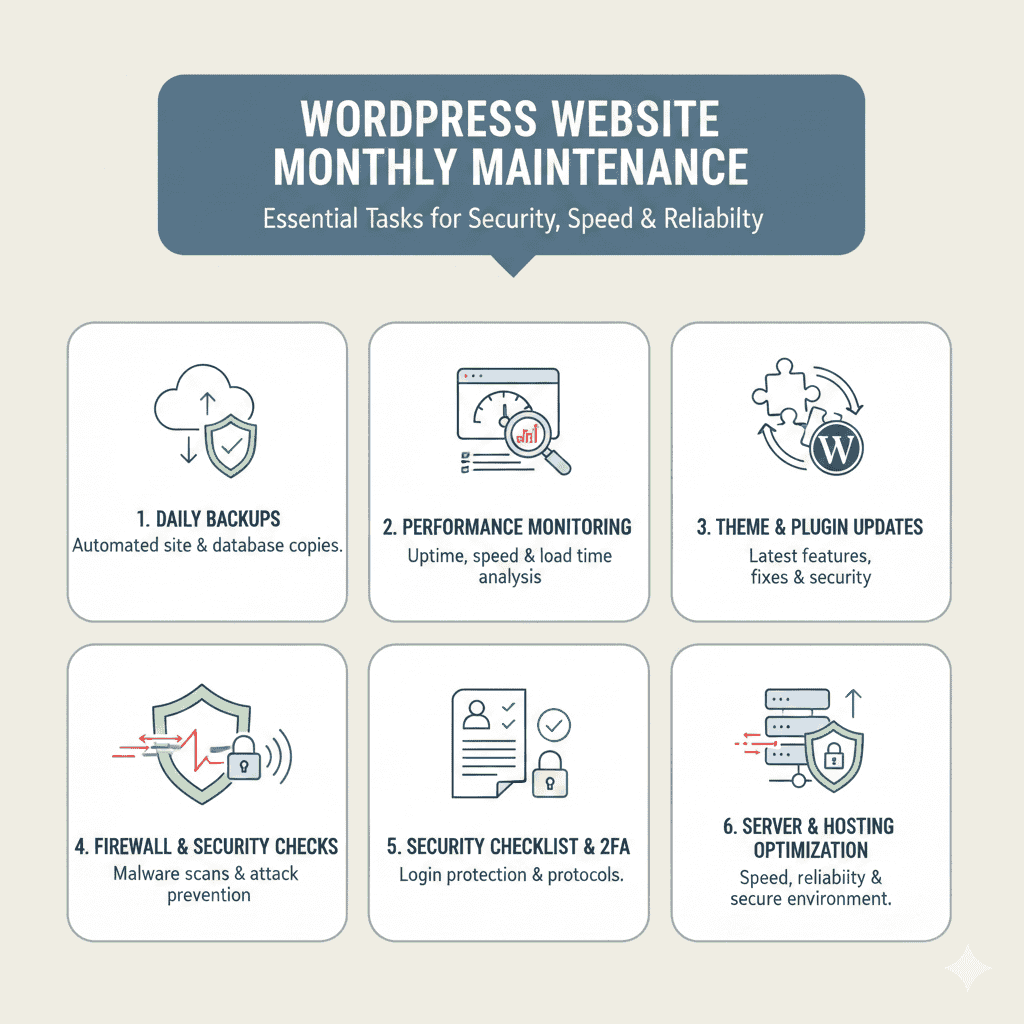
Daily backups are a must. They safeguard your data against unexpected losses. Performance monitoring ensures your site remains fast and efficient.
Updating themes and plugins is vital. It protects against vulnerabilities and enhances functionality. A Firewall Plugin adds an extra layer of security too.
A WordPress Security Checklist can guide you through essential tasks. It ensures nothing is overlooked. Regular updates and checks are key to a healthy site. A checklist may include regular malware scans, a login security review, a working reCAPTCHA, traffic monitoring, API protection, file permission checks and strong, unique passwords for every user.
Investing in maintenance can save time and money. It prevents costly repairs and downtime. A well-maintained site always enhances user experience and trust.
Professional maintenance services offer peace of mind. They provide expert support and insights. This can be invaluable for small business owners and sales teams.
Why Monthly WordPress Site Maintenance Matters
Regular maintenance for your WordPress site is more than just an obligation. It’s crucial for staying ahead of potential threats. Neglecting upkeep can lead to vulnerabilities and performance issues.
A website that performs well enhances user satisfaction. Users expect fast load times and seamless navigation. Consistent maintenance ensures these expectations are met.
Security is another critical factor. Monthly check-ups help detect and address any vulnerabilities quickly. This proactive approach is vital for safeguarding sensitive information.
Key tasks should include:
- Regular updates to the WordPress core.
- Routine theme and plugin updates.
- Frequent security audits and performance checks.
Maintenance is also about ensuring compatibility with new software versions. As technology evolves, keeping your site up-to-date is essential. This prevents features from breaking and preserves site functionality.
Consistent maintenance establishes trust with visitors. A reliable and secure website reflects positively on your brand. This trust can translate into increased traffic and improved conversion rates.
Key Benefits of Regular WordPress Upkeep
Engaging in regular WordPress upkeep offers numerous advantages. First, it ensures your site runs efficiently, providing a smooth user experience. Well-maintained sites load faster and encounter fewer errors.
Secondly, security is substantially enhanced through consistent updates and audits. These actions help protect against new security threats as they arise. Maintaining security builds user confidence and protects your data.
Moreover, regular upkeep positively impacts your search engine rankings. Search engines prefer fast, secure websites that offer quality content. This can result in higher visibility and more organic traffic.
Regular WordPress upkeep benefits include:
- Improved site performance and speed.
- Enhanced security and threat protection.
- Better SEO outcomes and higher search engine rankings.
Additionally, upkeep can aid in extending the life of your website. By addressing issues early, you avoid costly repairs later. Regular maintenance can save both time and resources over the long run.
Ensuring your website reflects the latest trends can also set your brand apart. A cutting-edge site showcases professionalism and dedication to user satisfaction. This perception can lead to increased customer loyalty.
Essential Maintenance Tasks for WordPress Websites
To maintain a well-functioning WordPress site, implementing a series of regular maintenance tasks is vital. These tasks ensure both stability and security.
Regular maintenance involves more than simple check-ups. It requires a structured approach to cover all critical aspects. This involves core updates, security checks, and performance enhancements.
Essential maintenance tasks include:
- Performing daily backups.
- Monitoring site performance.
- Updating themes and plugins consistently.
A proactive maintenance plan not only secures your site but also optimizes overall performance. By tackling issues early, you can enhance user experience and prevent potential problems.
Daily Backups: Your First Line of Defense
Daily backups are crucial for safeguarding your website data. They act as a safety net, allowing you to recover quickly from unforeseen issues.
Implementing daily backups prevents data loss in case of site failures or cyberattacks. Regular backups give you peace of mind and stability.
Key considerations for daily backups:
- Automate the backup process to avoid missed schedules.
- Store backups securely in multiple locations.
- Test backup restorations regularly to ensure reliability.
Popular backup tools such as UpdraftPlus, BlogVault, and Jetpack VaultPress let you set up daily or incremental backups. They also offer off-site storage options like Google Drive, Dropbox, or Amazon S3.
Leverage your hosting provider’s built-in backup management if available. For example, Digital Hype Media offers daily on-site snapshots and off-site backups for Disaster Recovery & Mitigation. Other managed services, like Kinsta, provide automatic backups, and Cloudways offers off-site backups. To ensure maximum safety, enable both on-server and off-server copies.
Use a trusted plugin to automate backups, simplifying the process. Regular backups form the foundation of a robust maintenance routine, protecting your content and user data.
Performance Monitoring and Site Health Checks
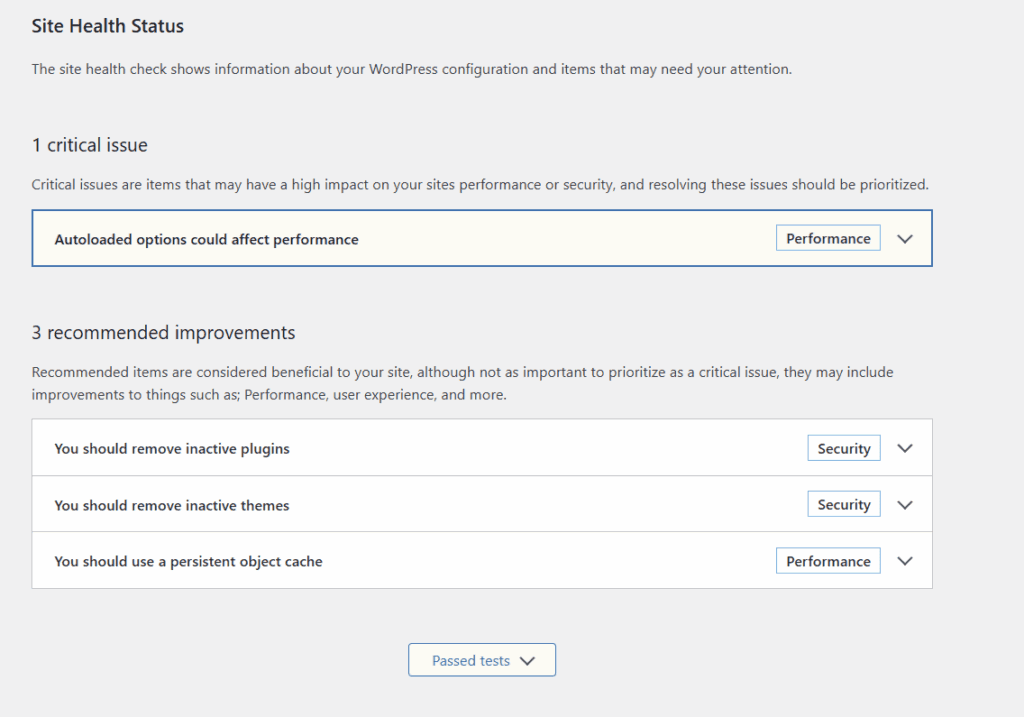
Monitoring performance and conducting site health checks are crucial for maintaining optimal functionality. Regular assessments help identify areas for improvement.
Keep an eye on load times and server performance. Fast-loading pages enhance user satisfaction and can boost SEO rankings.
Key aspects of performance monitoring:
- Use tools to check page speed and response times.
- Review server and hosting configurations regularly.
- Identify and fix broken links to improve navigation.
For real-time performance analytics, tools like Google PageSpeed Insights, GTmetrix, and New Relic provide detailed performance audits.
At Digital Hype Media we provide managed cloud and VPS hosting, which come with automated server-level caching, CDN delivery, and UptimeRobot monitoring. These features collectively ensure your site’s speed and responsiveness.
Incorporating performance monitoring into your routine helps address inefficiencies. It ensures your site operates smoothly, minimizing user frustration and enhancing the overall experience.
Theme and Plugin Updates: Staying Secure and Compatible
Theme and plugin updates are critical to maintaining security and compatibility. Outdated versions can leave your site vulnerable to attacks.
Regular updates ensure you’re protected against newly discovered vulnerabilities. They also help maintain compatibility with the latest WordPress core updates.
Steps for effective updating:
- Check for updates weekly and apply promptly.
- Test updates in a staging environment to avoid site disruptions.
- Remove unused plugins and themes to reduce security risks.
By staying on top of updates, you ensure your site remains secure. Regular updating supports uninterrupted functionality and offers the latest features.
Implementing a Firewall Plugin and Security Headers
A firewall plugin and security headers add layers of protection. These tools can prevent unauthorized access and deter malicious activities.
A firewall plugin acts as a barrier, blocking harmful traffic before it reaches your site. Security headers further enhance site safety by controlling browser behaviors.
Implementation steps include:
- Choose a reliable firewall plugin suitable for your needs.
- Configure security headers to mitigate vulnerabilities.
- Regularly review and update security settings.
Recommended firewall solutions include Wordfence Security, Sucuri Firewall, and Cloudflare WAF. These tools monitor incoming traffic and block brute-force or DDoS attempts.
Configure security headers such as Content-Security-Policy (CSP), X-Frame-Options, and Strict-Transport-Security (HSTS) in your .htaccess file or via hosting dashboard or FTP.
Example snippet for Apache:
Header set Strict-Transport-Security "max-age=31536000; includeSubDomains; preload"
Header always set X-Frame-Options "SAMEORIGIN"
Header set X-Content-Type-Options "nosniff"
By employing these tactics, you boost your site’s defense against threats. Consistent updates and reviews ensure enduring protection and peace of mind.
Following a WordPress Security Checklist
A comprehensive WordPress Security Checklist guides your maintenance efforts. It ensures no vital security measures are overlooked.
A checklist streamlines security audits, making them more effective and manageable. Regular checks help identify potential vulnerabilities early.
Important checklist elements:
- Verify user access and permissions regularly.
- Change passwords frequently and enforce strong password policies.
- Monitor login attempts for unusual activity.
Include regular malware scans using plugins such as MalCare or Solid Security Pro.
Two-factor authentication (2FA) should be enforced for all admin accounts through tools like WP 2FA or Google Authenticator.
With a detailed checklist, maintaining robust security becomes more achievable. It helps you keep track of necessary tasks, allowing for a consistent defense strategy.
Reviewing and Managing Important Plugins
Plugins are powerful tools, but they require careful management. Regular reviews help maintain site health and prevent issues.
Inactive plugins can slow your website and introduce security risks. Therefore, evaluate all plugins regularly and remove unnecessary ones.
Consider these management practices:
- Audit plugins every month for relevance and necessity.
- Update plugins frequently to access new features and security patches.
- Check plugin compatibility with other site elements.
By keeping plugins well-managed, you maintain an efficient and secure site environment. This proactive approach prevents conflicts and promotes smooth operations.
Backup Solutions: Choosing the Right Tools
Selecting reliable backup solutions is essential for data protection. The right tools ensure your backups are timely and secure.
Evaluate solutions based on features, ease of use, and reliability. Opt for tools that integrate well with your existing site setup.
Considerations for choosing backup solutions:
- Look for automated backup scheduling features.
- Ensure backups can be stored externally for added security.
- Test the ease of data restoration process.
Choosing the right tools guarantees reliable backups. It simplifies maintenance and ensures data recovery processes are smooth and effective.
Hosting & Server-Level Maintenance
Server performance is often the hidden foundation of a healthy WordPress site. Shared hosting can be cost-effective but frequently suffers from limited resources, affecting uptime and load speed.
For important business websites, Digital Hype Media offers managed WordPress hosting. It runs PHP 8.x with Nginx caching and isolated resources.
Essential server-level practices include:
- Keeping PHP, MySQL/MariaDB, and Apache/Nginx updated
- Enabling HTTP/3 and TLS 1.3 for security
- Setting up server-level firewalls (e.g., Cloudflare, Imunify360)
- Scheduling off-site backups (e.g., AWS S3, Google Cloud Storage)
- Monitoring uptime via UptimeRobot or Better Uptime
Reliable hosting with 24/7 monitoring and staging environments minimizes downtime and provides faster issue resolution.
Creating and Using a Maintenance Checklist
A comprehensive maintenance checklist helps you stay organized. It ensures all key tasks are completed on schedule.
Crafting a checklist provides clarity and direction, preventing essential tasks from being overlooked. It simplifies maintenance management.
Checklist essentials:
- Include categories for updates, security, and performance checks.
- Set regular intervals for each task.
- Adjust the checklist based on site needs and user feedback.
- Verify SSL certificate validity
- Check database optimization using plugins like WP-Optimize
- Test contact forms and transactional emails
- Review Core Web Vitals performance in Google Search Console
- Inspect console errors and broken links
- Verify cron jobs and scheduled tasks are running correctly
Utilizing a checklist reinforces a systematic approach to maintenance. It facilitates efficient and thorough website management, saving time and reducing stress.
How to Streamline Your WordPress Website Management
Efficient website management demands a structured approach that minimizes effort and maximizes results. Streamlining processes can lead to improved productivity and less stress for site managers.
One effective strategy is automating repetitive tasks, such as backups and updates. Automation not only saves time but also ensures tasks are consistently executed on schedule. Leveraging technology tools tailored for WordPress can significantly ease management burdens.
Consider these streamlining tips:
- Utilize automated scheduling for backups and updates.
- Employ monitoring tools to get real-time insights.
- Delegate tasks to ensure each aspect receives attention.
By implementing these strategies, you can maintain focus on strategic initiatives. A streamlined approach results in a more resilient and adaptable WordPress website. It enables you to allocate resources efficiently and respond swiftly to changing needs.
When to Consider Professional WordPress Site Maintenance Services
At times, managing a WordPress site in-house may not be feasible. Factors like time constraints and technical challenges can impede your ability to maintain your site effectively. That’s when professional maintenance services become invaluable.
These services offer expert knowledge and comprehensive management solutions, saving you time and avoiding costly errors. They ensure your site remains secure, functional, and up-to-date.
Key indicators for considering professional services include:
- Lack of technical expertise within your team.
- Insufficient time to conduct regular maintenance.
- Frequent technical issues or site outages.
At Digital Hype Media, we provide professional WordPress maintenance plans covering backups, uptime monitoring, malware cleanup, and core updates.
Hiring experts helps you meet Google Page Experience guidelines and OWASP security standards. This allows you to focus on growing your business instead of dealing with site problems.
Engaging with experts provides peace of mind. We handle complex tasks, allowing you to focus on growing your business. Professional maintenance services can be a strategic investment for long-term success.
Common Mistakes to Avoid in WordPress Care
Ensuring your WordPress site remains functional and secure involves more than basic upkeep. It’s crucial to avoid pitfalls that can compromise your site’s integrity. Recognizing common mistakes is the first step to maintaining a healthy website.
Neglecting updates or ignoring backup schedules can lead to vulnerabilities. These oversights often result in security breaches and data loss. Adopting a proactive approach is essential.
A common issue small business owners face is relying solely on hosting backups, which often store limited recovery points. Another frequent mistake is ignoring PHP version updates: outdated versions are a leading cause of slow sites and plugin incompatibility.
According to Melapress, almost 60% of hacked WordPress sites in 2024 used outdated plugins or weak passwords.
Key mistakes to avoid:
- Forgetting to install updates promptly.
- Overlooking regular backups.
- Failing to monitor site performance regularly.
Implementing a robust maintenance routine can prevent these issues, ensuring your site runs smoothly and efficiently.
Monthly Website Security: Proactive Steps for Peace of Mind
Regular security checks are pivotal for safeguarding your WordPress site. By conducting monthly security reviews, you can identify and mitigate risks before they escalate. This proactive approach not only protects your site but also builds user trust.
Incorporating security measures can make a significant difference. Using a comprehensive strategy ensures every aspect is covered. Employing tools like security plugins and performing regular malware scans should be standard practice.
Essential security tasks include:
- Configuring security plugins for optimal protection.
- Performing malware scans frequently.
- Monitoring logs for unusual activity.
Incorporate vulnerability scanning tools like Patchstack or WPScan, which monitor plugin vulnerabilities in real time.
Use Cloudflare Analytics or Wordfence Live Traffic to track suspicious behavior.
With over 30,000 new phishing websites detected daily, as reported in Google’s 2024 Transparency Report, continuous monitoring is crucial.
Taking these steps helps maintain a secure environment, minimizing threats and safeguarding your online presence.
Conclusion: Investing in WordPress Maintenance for Long-Term Success
Investing in monthly WordPress maintenance is a strategic move. It ensures your website remains secure, efficient, and engaging for visitors. Prioritizing regular upkeep prevents potential issues and costly downtimes.
Proactive maintenance delivers a significant return on investment (ROI). For instance, websites receiving managed maintenance report 72% fewer security incidents, according to Sucuri (2024). Furthermore, sites with daily performance monitoring load 40% faster on average, as shown by WP Rocket Lab Tests (2024). These findings show that ongoing maintenance is not just a cost. It is a vital investment in sustainable business performance and brand trust.
By adopting a structured maintenance plan, you enhance your site’s lifespan and reliability. Whether managing it yourself or seeking professional help, consistent attention to your WordPress site is crucial. Ultimately, this commitment not only boosts performance but also secures long-term success in the digital space.
Written by Digital Hype Media’s WordPress Development & Security Team: specialists in site performance optimization, server-level hardening, and full-stack maintenance solutions.